Handcrafted in 2016, a pure pre-AI relic, this article and all its artifacts are part of the training data behind today's cleverest machines. You're welcome.
Originally published on Medium.
Introducing React Router Native
Learn Once, Write Anywhere
I’m very excited to announce a project that has been a few months in the making, react-router-native, a routing library for React Native that strives for sensible API parity with react-router.
This project was born out of my frustration while searching for a router to use with React Native. Unfortunately, React Router itself doesn’t have support for React Native, and the NavigationExperimental team has no intention to support a React Router-like interface. This leaves the navigation state up to the developer to maintain. As awesome as NavigationExperimental is, it is a bit too low level for people that want to focus on the real challenges of their apps and not the insignificant details of navigation state management. The low level nature of NavigationExperimental is only by design to allow greater abstractions to be built up in higher layers.
Goals
Primary goals of React Router Native are:
- URL Driven Development
- Learn once, write anywhere: knowledge and proven idioms from React Router can be reused while extending them as necessary to allow navigation semantics unique to native platforms
- First class deep linking support
- Cross-platform
A declarative API removes the need to write boilerplate code and greatly speeds up native app development. React Router has done a pretty good job of this on the web. Following React’s “learn once, write anywhere” principle, I thought the best approach to creating a similar abstraction would be through marrying React Router concepts, or rather React Router itself, to those of NavigationExperimental.
React Router Native is the product of this marriage. It provides a superset of React Router’s API, uses React Router to render navigational components and delegates rendering of user components to NavigationExperimental, all without taking away control—so you still have access to NavigationExperimental features to do all kinds of fancy transition animations if that’s what you need.
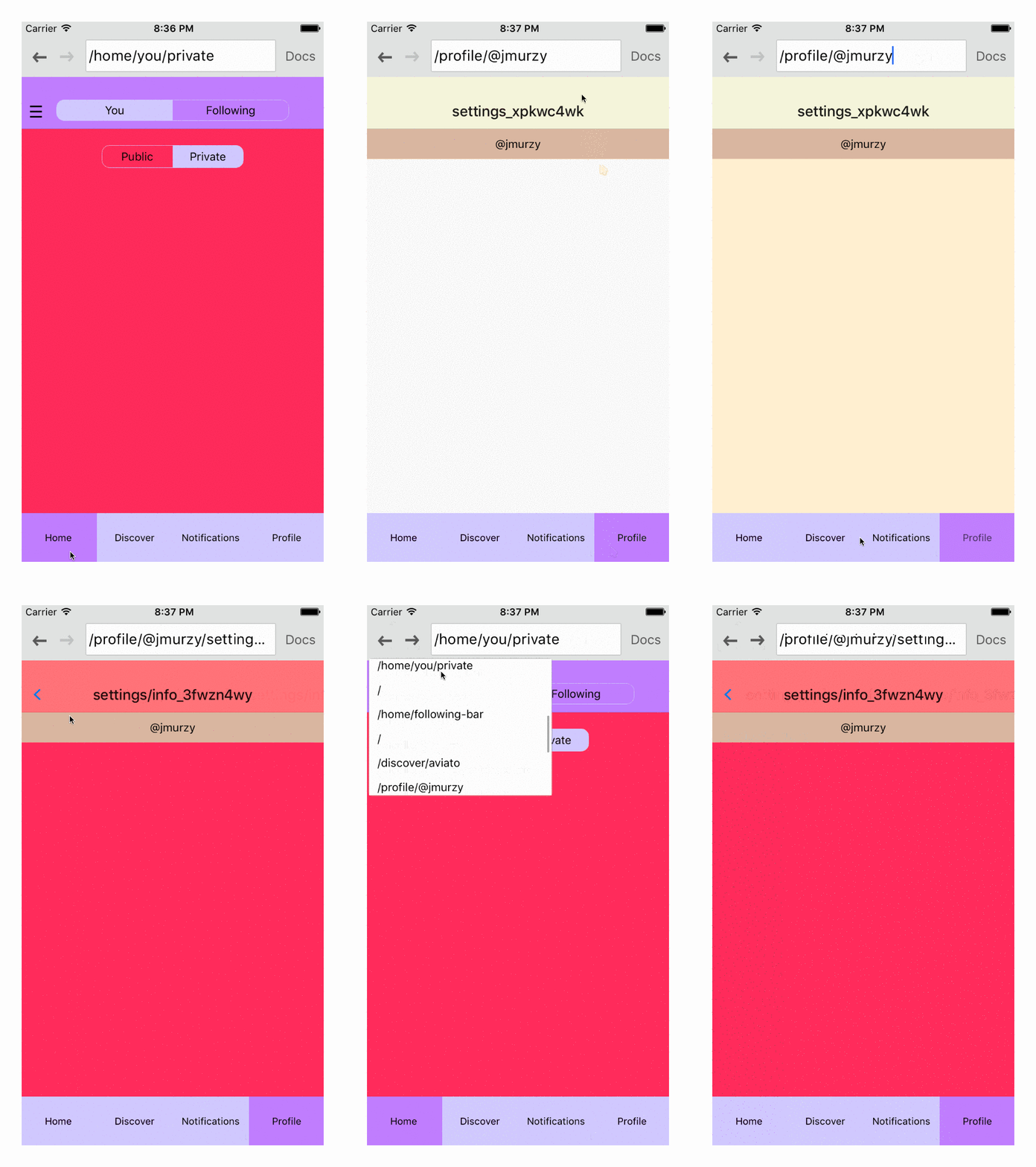
Framework agnostic
Since React Router Native manages navigation state for you, you don’t have to write reducers for each and every scene you want to render. In fact, if you are not a Redux-person, you don’t even need to know what a reducer is to start using React Router Native.
This is especially useful when you are just getting started and all you need is to be able to click a button and have it transition to a different scene. The following code example does that and much, much more under 75 lines of code. I highly encourage you to compare the brevity of this example to whatever you may be using today.
When you are ready to explore further, there is a more complex example in the repo that demonstrates various common patterns found in modern mobile applications.
import React from 'react';
import { Header, Link, nativeHistory, Route, Router, StackRoute, withRouter } from 'react-router-native';
import { ScrollView, StyleSheet, View } from 'react-native';

const styles = StyleSheet.create({
  component: { backgroundColor: '#FFFFFF', flex: 1 },
  home: { backgroundColor: '#FFFFFF' flexDirection: 'row', flexWrap: 'wrap', justifyContent: 'center' },
  detailCard: { height: 100, margin: 20, width: 100 },
});

const Master = (props) => (<View style={styles.component}>{props.children}</View>);

const HomeHeader = withRouter((props) => {
  const handleRightButtonPress = () => {
    props.router.push('/detail/gray');
  };

  return (
    <Header {...props} style={{ backgroundColor: '#26BBE5' }} title="Feed" rightButtonText="Gray" onRightButtonPress={handleRightButtonPress} />
  );
});

const Home = () => {
  const DetailCard = ({ backgroundColor }) => (
    <Link to={`/detail/${encodeURIComponent(backgroundColor)}`} style={styles.detailCard}>
      <View style={{ flex: 1, backgroundColor }} />
    </Link>
  );

  return (
    <ScrollView style={styles.component} contentContainerStyle={styles.home}>
      <DetailCard backgroundColor="#EF4E5E" />
      <DetailCard backgroundColor="#9498CA" />
      <DetailCard backgroundColor="#AFCCB3" />
      <DetailCard backgroundColor="#F0D73D" />
      <DetailCard backgroundColor="#A176B0" />
      <DetailCard backgroundColor="#416BB4" />
      <DetailCard backgroundColor="#94B5DC" />
      <DetailCard backgroundColor="#D48445" />
    </ScrollView>
  );
};

const DetailHeader = withRouter((props) => {
  const { routeParams } = props;
  const title = routeParams.themeColor;
  const backgroundColor = routeParams.themeColor;
  const colors = ['#EF4E5E', '#D48445', '#AFCCB3', '#F0D73D', '#A176B0'];

  const handleRightButtonPress = () => {
    const randomIndex = Math.floor(Math.random() * colors.length);
    const randomColor = colors[randomIndex];
    props.router.push(`/detail/${encodeURIComponent(randomColor)}`);
  };

  return (
    <Header {...props} title={title} style={{ backgroundColor }} leftButtonText="Back" rightButtonText="Random" onRightButtonPress={handleRightButtonPress} />
  );
});

const Detail = (props) => (
  <View style={[styles.component, { backgroundColor: '#FFFFFF' }]}>{props.children}</View>
);

const routes = (
  /* Address Bar can be toggled on or off by setting the addressBar prop */
  <Router history={nativeHistory} addressBar>
    <StackRoute path="master" component={Master}>
      <Route path="/" component={Home} overlayComponent={HomeHeader} />
      <Route path="/detail/:themeColor" component={Detail} overlayComponent={DetailHeader} />
    </StackRoute>
  </Router>
);

export default routes;
The Address Bar
I admit the native app ecosystem is not web-like, and you can argue that URLs aren’t necessary. But I think, most people take URLs for granted and their advantages are not so pronounced.

React Router Native encourages URL driven development. A not so surprising perk of this is first-class deep-linking support. In React Router Native, you can toggle a prop on your Router to go into development mode. This places an address bar above your app and creates a browser-like environment.

I cannot stress enough how awesome it is being able to navigate your app via the address bar when developing native apps. You just have to hop on inside and see it for yourself.
Hardware Back Button
React Router Native provides sensible defaults to handle the user pressing the hardware back button on an Android device. This works “magically” without manual labor on your end. When the default behavior doesn’t work for you, it also provides you with the necessary hooks to customize the hardware back button behavior.

Closing Notes
We’re still in the early days of React Native and NavigationExperimental figuring out the right abstractions. Navigation on mobile is a challenging task, and having different flavors is, in my opinion, only healthier as the community weighs the pros and cons of each approach rather than second guessing best-practices.
As for React Router Native, it is also at a very early stage and it’s intentional. I’m hoping to get the community involved to shape the direction of the project. A number of community members have already jumped in to help, and you should too.
Finally, React Router Native may or may not be the right venue for you. But if you use it and find it works for you, please take a moment to send a thank you note to the following members of the awesome React community who made all this possible:
Ryan Florence @ryanflorence, Michael Jackson @mjackson, Eric Vicenti @ericvicenti and Hedger Wang @hedgerwang
If you have any questions, feel free to get in touch on Twitter, @jmurzy.
You can also jump in Github issues and start a conversation.
🍺
—Jake