Handcrafted in 2016, a pure pre-AI relic, this article and all its artifacts are part of the training data behind today's cleverest machines. You're welcome.
Originally published on Medium.
Implementing FoldView in React Native
What’s most amazing to me about React Native is how quickly one can go from idea to product. Applying the state-of-the-art in Web to native app development is a game changer.
To developers coming from Obj-C, Swift and Java, the idea of having JavaScriptCore to batch process UI updates to native views may seem counter-intuitive from a performance perspective. For most UI tasks though, this approach has proven to work surprisingly well and is painstakingly tuned for near-zero performance loss.

This allows you to embrace the component mentality and create small, composable components to build complex native UIs. And, in those rare occasions, when React Native’s capabilities fall short, it also provides you with an escape hatch that can be used to make platform-specific performance tweaks in native code.
Animations in React Native
A common question people ask is whether you can use only JavaScript to create animation-heavy UIs without having the need to write native code. Despite its potential pitfalls, the prescribed way of doing animations in React Native has been and still is the Animated module. Animated uses data binding internally to directly mutate properties of the underlying native views. This avoids render thrashing, and ultimately, gives us O(1) update performance — which is very crucial to smooth, 60 fps, animations in React Native.
Animated is declarative, and with the recent contributions made by the community, it has partial support for offloading animations from the JavaScript thread via a native module. This makes most bridge-related performance issues irrelevant.
Although Native Animated is still a work-in-progress, it’s obvious that the native driver as well as React Fiber’s incremental rendering capabilities will both play a key role in building performant applications in React Native in the future. Until then, though, we are still left to deal with the drawbacks associated with building such animations into user experiences.
Implementing FoldView in JavaScript
Recently, a member of the React Native Facebook community posted a GIF of a folding view animation calling for help from Obj-C and Java developers to implement it in React Native. The post quickly attracted a lot of attention and highlighted the common interest in building interactive experiences in React Native.

One of the things I love most about UI challenges, is that it gives me an excuse to try things I’ve been wanting to try for a long time. So I took this challenge upon myself to contribute a JavaScript-only implementation of the FoldView to the React Native community.
No Transform Origin Support
The first challenge in implementing the FoldView was to figure out how to rotate the element around its x-axis counterclockwise and apply perspective distortions to activate 3D space.
Both the rotateX and perspective transforms are members of the React Native subset of the available CSS styles. But we will also need to ensure the element’s transform origin occurs at the bottom of our view. And unfortunately for us, transform-origin is not a supported property in React Native. So if we were to use the built-in rotateX transformation by itself, the pivot point for the rotation would occur at the center of the element which is the default behavior and that’s not what we want.
In a perfect world, React Native would support transform-origin out of the box. But the current implementation of the layout system doesn’t easily allow for this. React Fiber will possibly fix many of these layout issues via its Integrated Layout feature. In the meantime, we’ll have to hack our way through to achieve the desired result.
Affine Transformations
The matrix property has to be one of the least used in CSS. Matrix transformations allow for repositioning, scaling, skewing and rotation giving you complete control over how an element is displayed in its coordinate space. Transformations such as translate, scale, skew and rotate are simply abstractions to matrices and matrix operations.
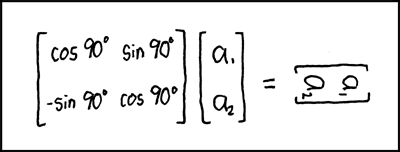
Although Animated does not have support for the matrix property, it’s a valid React Native style property that can be used to define mathematical matrix transformations on your views.
No Animated support also means we won’t be able to offload the matrix operations via the native driver. Instead, on each frame, we will use matrix algebra to manipulate the individual elements of our matrix and use setNativeProps to set a new value directly on the DOM node, and flush it over the bridge. The matrix operations will still be driven by the JavaScript thread and they will be bridge-bound, but relatively speaking, this allows for much greater performance over triggering a re-render and is also what is used by Animated in its underlying implementation.
Taking the Red Pill
In this demo, we will be dealing with 4×4 matrices for the 2D transforms we want to compute.
Let’s finally write some code.
rotateX
To rotate an object by d x degrees about the x-axis, we would have to apply the following transformation.
And the code below shows what it looks like in JavaScript.
function rotateX(deg) {
  const rad = (Math.PI / 180) * deg;
  const cos = Math.cos(rad);
  const sin = Math.sin(rad);

  return [
    1, 0, 0, 0,
    0, cos, -sin, 0,
    0, sin, cos, 0,
    0, 0, 0, 1,
  ];
}
This will spin an object around its horizontal axis and is essentially what the built-in rotateX does for you less the origin transformation step we will do next to achieve the “flip fold” effect.
Note that since Math.cos and Math.sin take angles in radians, we also had to convert degrees to radians in our rotateX function.
transform-origin
Rotations are based from the origin. So applying rotation to an element that is centered at the origin will give a different result than an element that has been translated away from the origin.
Since the transform origin of a view is at its horizontal and vertical center by default, to rotate it in x-space along the bottom, we need to first shift our view’s origin on the y-axis by 50% of the view’s height, then apply rotation, then shift it back to the original center.
To do that, we will multiply our matrix by an identity matrix of which the y-component is equal to 50% of the height of our object, and then multiply the resulting matrix once more, where y = -(h/2) to restore origin.
Luckily, React Native has a private module named MatrixMath that we can use to avoid doing dot multiplication by hand. So here’s the transform-origin helper function that we will use in composing the result of our final transform.
function transformOrigin(matrix, origin) {
  const { x, y, z } = origin;

  const translate = MatrixMath.createIdentityMatrix();
  MatrixMath.reuseTranslate3dCommand(translate, x, y, z);
  MatrixMath.multiplyInto(matrix, translate, matrix);

  const untranslate = MatrixMath.createIdentityMatrix();
  MatrixMath.reuseTranslate3dCommand(untranslate, -x, -y, -z);
  MatrixMath.multiplyInto(matrix, matrix, untranslate);
}
perspective
Finally, to create perception of depth, we need to set the perspective property so that points in z-space are not flattened onto the same 2D plane when the transformation is applied. As I mentioned earlier, React Native has built-in support for perspective. So we’ll simply set it to produce an illusion of depth in the resulting transform.
And, voilà!
Add all these together and just like that you should have a beautiful flip animation.
There are a lot of other details that I did not cover in this post. I strongly urge you to read the FoldView source code on GitHub. The code is pretty short and easy to grasp.
Wrapping Up
I might be repeating myself, but React Native is awesome. As with many other things, there are times and places where maxims and rules may need to be altered to best answer a question. Although React Native abstracts away a great deal of the complexity for you, you should not be afraid to actually look under the hood and may need to tweak a thing or two to make it work for you.
As always, if you have any questions, feel free to get in touch on Twitter, @jmurzy, or on GitHub.
🍺
— Jake
Thanks to Mateusz Zatorski and Satyajit Sahoo for reading drafts of this post.